Tuesday, 22 July 2014

Reflecting Over The Last Year in my Flipped Primary Classroom

This year has been one of my most exciting, and one in which I have learned so much from, regarding the implementation of technology into my primary classroom.  Impressing Ofsted, being featured in The Guardian, holding my first Webinar for ITSLearning and having over 20,000 hits on my blog!   


So what went well, what didn't go very well and what is in store for next year?

My Flipped Classroom using Edmodo

This has been my biggest success this year without a shadow of a doubt.  It has changed the way I work day in day out in my classroom and I'm beginning to see some real impact since its implementation.  

The future is very bright for this method of learning in my classroom when combined with social media, who knows where it can take me and my class!  

It has been a superb learning adventure, one that started back in January at The BETT show and has led me to start this blog, run a Webinar, sign up to TeachMeet, and run CPD later this year.

Edmodo

This piece of FREE online software transformed my flipped classroom and you can read more about my journey - here

I'm planning on using more online collaboration, homework and involving parents with the platform - stay tuned.

Padlet - Aiding Pre-Planning

Once again Padlet has been a big hit this year for collecting and storing information and questions from the children.  It has been a superb way in helping me plan during my half term breaks without the children actually being in the classroom.

I'll certainly be using this application again next year to share thoughts, ideas, pictures, web links and much more when the children are not in the classroom.

Scratch - Computer Programming

I introduced Scratch into my Year 3 class this year with HUGE success.  The children are now freely creating and collaborating on games and animations at home and continuing them in school and at Coding club, read more here

The children used Edmodo to share and help each other by sharing screenshots of code and asking for help with ongoing coding projects -  they really are inspired.

I'm hoping to introduce Programmable Robots (no, not Roamer) next year and show the children how they can control items in the real world via computer programming.

Using videos to find next steps in PE

By using iPads and cheap handheld video cameras the children were able to film their performances and compare to professional sportsmen and women.  They could then see how they could improve further by analysing  the footage - read more here

I intend to use more social media to ask for help from coaches around the world. Watch the video - what can we do next to improve?

iBook Author and Book Creator

Giving the children an opportunity to choose how they would like to present their work led me to Book Creator.  The children used this simple iPad application to produce some of the most engaging books this year.

Being able to embed sound, images, video and text into a book has made report writing come alive this year. Get. This. App.

I'm hoping to be using iBook Author next year to create more books, but this time hopefully submit them online to be 'published.'  This will really give the children a purpose for learning.

Children running their own CPD sessions for staff on Coding

This was a stroke of genius that came to me when I was planning the second session of training on computer programming - just let the children do it!

They were magnificent. The session ran beautifully and inspired the staff to try it for themselves in their classrooms.  The children modelled different aspects of coding and answered any question the staff had when they got stuck.

Next year I will be inviting the children to run their own Coding Club for the new Year 3 class with an option for staff to drop in when they feel they need a helping hand. Coding Ambassadors.

We'll be covering video editing, music creation, coding, robotics and much more - let the CPD continue!  I'll also be getting the children to create coding guides for flipped learning to be hosted on our school website.

Blogging - Me and The Children

Blogging took off in a huge way for me. I find it great for connecting with people, being reflective about my work and a way of inspiring others to give things a try.

The children didn't share my enthusiasm. We used EduBlog and it didn't capture their imagination.  I'll be trying again this year, with a less cluttered blog. I want them to have an online Learning Journal and to show how useful it can really be.

Going forward - where do we go from here?

A question I've been asking myself over the last few weeks.  Where can I take these children now, how can I build on all the amazing things we've discovered this year? I've never had an opportunity to follow a class up into the next class, but one I am relishing.  I'm taking my current technology enthused Year 3 class into Year 4, so a lot of skill acquisition lessons can be skipped for more time experimenting and improving.

Robotics linked to Scratch

The logical next step is start building on the children's programming skills and give them a real life challenge involving robots.  Using the Vex IQ kits, I'm going to be setting the children a variety of problems linked to our book Mortal Engines.  

I asked for a demonstration at The BETT show and I was amazed to see them using Scratch to write code to control the various motors of the robot.  The children will build on their skills, I'm sure.

Minecraft EDU - Building Virtual Worlds

This has massive potential, if used carefully.  I intend to use it to link to Mortal Engines, the book that I'll be planning all our learning adventures from.  

I want the children to build virtual worlds and use them as a base for story writing, problem solving maths investigations and engineering.  I am looking forward to getting this up and running next year.  Stay tuned, this could be a HUGE hit!

Creating an Online Video Library.

One of the problems faced this year using Edmodo was when an area of learning was completed the video dropped down the timeline.

I want to create a library of videos we've used for the whole school to access, including our parents.  Having an online library available will enable all stakeholders to  access the videos, on any subject, at anytime.  Our new maths curriculum will be utilising these videos - watch this space.

Makey Makey - Building Something Purposeful

I really want to boost our DT curriculum into our computer curriculum more this year - the whole STEM curriculum is exciting me!

Our first project will be to design and build our own computer gamepad. The children will program the Makey Makey kit to control the games they've created this year on Scratch.  

I really want them to design a gamepad that the circuit board can fit into and then market the whole package, a young enterprise project linked to our maths curriculum.  I'm hoping to find a company who would let us use their 3D printer to actually build their designs - any takers?

App Designers - A Future Business.

One of things I never got around to doing this year was teaching the children how to design and create their own apps using a WSYWIG system.  

This will be how the children will be publishing  their non-chronoligcal reports next year.  Gathering information and creating a selection of information apps based around the topic they're researching.  

As we have an account with iBuild App, I really want the children to actually publish their designs to the Apple and Google stores and sell them - How's that for real life STEM!  Just think about the amount of the curriculum that could be covered in that one project - I'm excited.

And the future for me?

Well, as I said earlier I'm venturing into Year 4 and I cannot wait! I love a new challenge and it'll help keep things fresh and interesting. 

We're starting to plan in a very adventurous way next year - the children will be leading the journey, we really don't know where we are going to end up at the end of the year - it really has got me excited.  The children really will drive the adventure.  The plan is to start with the child, move out to the local area, then further afield and onto global issues.  

Hopefully over the next few weeks the article on Flipped Learning I've written for Teaching Times will be published and you can have a read on their website or magazine - another milestone achieved this year.

I've also been asked by Subject Support to run two, one hour online training sessions in December and March with an emphasis on setting up your own flipped classrooms. You can find out more about this  - here

You can still watch my Webinar on Flipped Learning.


This school year has been one of the most memorable for me and I'm excited about the future.  Looking forward to writing more next year - I'm going to try and keep blogging over the summer, especially when I'm playing around with some new kit.

Follow me on Twitter @chriswaterworth

Wednesday, 11 June 2014

Using Technology to Communicate with Parents.

How does your school communicate with stakeholders?  How often do you do it?  When is the best time to do it?  All things we've considered at school and questions that we hoped we've answered, but we're always evolving.

Whether it is a detailed newsletter each week or regular updates on Twitter and Facebook, letting your parents' know what is going on in schools is essential in our modern world.


As parents we tend to ask our children what they've done at school when they get home - classic answer "I don't know, I can't remember"  So how do we help parents get their children talking at home about their learning?

Getting the children talking about something they've done in school can help them further understand a concept or to tackle any misconceptions that they've got around a certain subject.

Our world is now a place of instant sharing, instant messaging and instant answers.  We log onto Facebook to find out what our friends are up to, log into Twitter to read the latest news, and use search engines to find out the answer to questions.

So what do we currently use in school?

Facebook Pages and Twitter feeds have been a real hit with the parents in our school. Teachers are taking photographs of children's work, sharing things that are happening in school and posting links to interesting articles.

We have found that the parents are commenting on the photographs and are seeing throughout the day what their children are learning in school.  We've found that the parent's have a way to start a conversation with their children by showing them a picture of their work or work that is going on in the classroom.  Parents are free to comment on pictures and information - it helps to sell your school as well, free advertising!

Experts from around the world.

Using Twitter we've been able to share with the world. We've shared work, thoughts and ideas with experts from theatres, museums and various places we've visited.

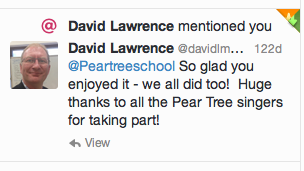
David Lawrence: Principle Conductor for The Young Voices Choir
The children love to read these tweets from people they have admired and learned about during their time in school.

Sharing your learning online allows children and parents to get in touch with experts and maybe even tap into some of their expertise.  A real purpose for using technology.

You can read about Children as Publishers rather than Consumers here. 


Using Facebook to share information instantly, during lessons has been a great way to record a learning journey for the children, teachers and parents.

It gives a central place for the children to see their work, gives access to photographs for teachers quickly and allows parents to see what their child has been learning that day.  A conversation, either online, or in the real world has begun.

Your audience is already there. Most, if not ALL your parents will have a FaceBook or Twitter account, why not tap into that communication source?  We're starting to find more parents are reading our weekly news letter on Facebook or Twitter than on our school website. 

E-Saftey

We have carefully thought about the risks of sharing information online and have produced a social media policy (part of the e-safety policy) and completed a risk assessment around the use of the social technology. We will never share a face, a name, or personal information online, just like we wouldn't on our school website.

Sharing a photograph of a piece of work is enough to get the children talking at home and keep parents informed as to what they are learning in school.

Keeping Stakeholders Informed: What else do we do?

Keeping parents up to date with what is going on in school is essential, I cannot stress this enough.  Parents are busy, children are busy, if you want a parent to know something, a termly news letter is not enough anymore.  Schools are incredibly busy places.

Text and Email - Send messages directly to them (avoid the school bag!)


Most schools utilise email and texting services now, we use http://www.teachers2parents.co.uk/  A great way to get a quick, short message to parents.


School iOS and Android App - News Letters on the go


Pear Tree School App - Download

How many schools use a simple app to help parents and children keep in touch with things going on at school?  We decided to invest in a simple RSS Feed based app for our school. 

I used on online WYSIWYG system from http://ibuildapp.com/ 

It is relatively easy to set up and if you pay for a business account (around £170/year) they will even submit it to Android Market and The App Store for you.  You will need an Apple and Google Developer account to do this though - £15 for Google, and £60 for the Apple account. 

I have designed our school app to just 'retrieve' the news letters from our school website via RSS feeds.   Using this model I can publish each class news letter, each week, and it will automatically be available via the school app.  We have links to our Twitter Feed, embedded maps and links to some videos to help showcase the work in our school.

School Website - Everybody has one, right?


Our School Website has been a labour of love for me. I built the whole site using iWeb and will continually add more and more each week.  Have a look - here

It is a great way to showcase your school and I'm always surprised when I visit some school websites to find them with outdated news, dead links and very little information.

Schools spend thousands and thousands buying into a pre-built website and then never update it.  Why?

It is, more often than not, the first port of call for parents and visitors when finding information out about your school.  Parents use our website for newsletters, photographs, our calendar and accessing essential school documents.

Ofsted will look at your school website, they will start to make judgements about your school using the information you provide. Make it easy to use, and a clear representation of the things that happen in your school. We put a link on there for the lead inspector to follow to access key information.

There are loads of links out there detailing what should and shouldn't be on school websites, but ultimately - get it updated and showcase the amazing work that goes on in your school.

Getting it right for your school.

Whatever method you choose, make sure you are consistent with what you do. Sharing information and work has proved very successful at our school. Parents feel as though they know what is going on in each classroom and information is always readily available.

We have some classes sharing more than others via FaceBook and Twitter, but it is beginning to be used more and more throughout the school.  People are beginning to see the advantages it has.

So choose carefully, evaluate what you have done - what worked and what didn't and ask parents for feedback.


Webinar - Pause, Rewind My Teacher: A Flipped Learning Approach

I presented a Webinar on Flipped learning a few weeks ago that is still available to watch online.

I'd like to thank ITS Learning for allowing me to share my research with the world.

You can watch it again on YouTube - here


It was a great experience and I'm hoping to do some more workshops in the future. If you are interested in me coming to your school to present my work on flipped learning please get in touch videosformyclassroom1@gmail.com

Follow me on Twitter @chriswaterworth


Thursday, 5 June 2014

Flipped Learning: Flipping Primary English and Art Lessons

It's been a few weeks since my last blog; reports and writing a script for The Children's Shakespeare Festival have got in the way of me writing on here. With reports and the script out of the way, I thought it was about time I wrote about my recent adventures with Edmodo and how the children in my Year 3 class have been using it.


We've been using Edmodo for a few months now and it has transformed the way I have approached my classroom.  Using Edmodo in a flipped classroom seems to be the final piece of the puzzle.

So far I have used Edmodo to:
- Set and receive homework
- Create a place for online feedback
- Allow the children to collaborate online
- Share links, videos and photographs
- Communicate with parents
- Share work instantly in the classroom

All this has contributed to a much more organised online classroom. A classroom which the children enjoy learning in.

The image is one of the ways I've begun flipping my classroom for English. I started a while back now flipping my maths lessons and this is really embedded in my classroom. It was time to try something different.

Flipping Primary English and Drama

I started a new topic this term as we've been invited to perform at The New Vic theatre in Stoke as part of the Children's Shakespeare Festival.  A huge opportunity for the children in my class to perform on a real stage with professional lights, sound and stage managers. How could I not do it?

As you can read in my previous post (Online Feedback and Peer Assessment) I planned with the children using Padlet and produced our new learning adventure.  The stage was set for a great final term with the children.

So I began to post parts of Shakespearean text for the children online to get them thinking about their work before they arrived in school.  After I posted the prologue to Romeo and Juliet my iPad started to beep with notifications from the children talking, and sharing thoughts and ideas about the upcoming lesson.

"Why are the families at war at the start of the story?" 
"Who dies in the story, who takes their life?"

Some really great questions posed by the children themselves. Something I could have done in the classroom, but crucially it had already got the children thinking about their upcoming learning. Perfect - the learning had begun.

When the children arrived in the classroom, they had already experienced the Prologue with parents at home, they'd asked questions, thought about language, and answered a few questions of their own.  

I had also posted the 'Do you bite your thumb at me,' scene prior to our drama session. The children had read it and started to learn the lines needed.  A great way for children to learn lines, so I could focus on the delivery and meaning of those lines. Time saved - more chances for effective learning in classroom time.

A great start, but how far could I take this?  

Could I put the entire learning process online?

Online Feedback: What are my next steps?

I decided to try and use the assignment feature that Edmodo has built into it, a really simple way for children to submit homework, for teachers and children to leave feedback. 

This is the homework I set the children. They logged on read what they needed to do, completed their homework and then uploaded back to me via Edmodo.

I had taken an entire unit on Non-Chronological report writing and put it in the hands of the children. We had produced a few reports this term on Aztec, World War II, and Chocolate production, so this was a real test of independence.  

One of the first things I insisted the children do was to post the questions they were going to research online for the whole class to see.  I encouraged them to do this so they could get feedback on their questions from not only me, but possibly from the whole class - that's a huge advantage of using this method for peer assessment, thirty children peer assessing instead of just a learning partner.

The image shows that the children began helping each other pose better questions. One child here pointed out that the 3rd question was quite closed, so maybe they would need to think again.

What developed was the whole class were peer assessing online and supporting each other in the completion of this report.

I encouraged the children to post parts of their reports online for feedback, and the class obliged, they really did. Spell checking, sentence checking, fact checking in some cases!  All the things I had modelled throughout the year in the children's writing books was being done independently, but online.

We did need to work on the type of feedback they were giving at some points. Writing 'Awesome,' or 'I don't agree,' isn't quality feedback. I modelled good practice; post a reaction, but suggest a way that they can improve further.  It began to filter online, the feedback was of much better quality.

Submitting Their Work: Time to Reflect

After a week the children started to 'turn in' their reports online for their feedback. It didn't matter if they hadn't finished, it was a chance to get feedback half way through the report.  Here is an example I sent back to one child in my class.

The children received their feedback and then they acted on it, before finally submitting it again.  

From a 'time saving' point of view, it was great. I didn't need to sit a desk with a pen to do this, I could do it when I wanted to and where I wanted to.  The work would come to me!  No books to carry around.

The whole process was a huge success and the children loved the fact that it was all online and they could get access to it whenever they wanted to, and still can get access to it. It's in their personal Edmodo library.

Back in school I gave the children an opportunity to make any final changes to their work before printing them out for their Learning Journals.  It was now offline and back in the real world. I had presentations happing in one corner when a group of children crowded around a MacBook whilst one of them gave a talk on Shakespeare using the Prezi they'd submitted. A personal favourite of mine from the project.

Flipping an Art Lesson: Online Video Guides.

I wondered, could I flip an art lesson?  Our children have been invited to display their work at Nantwich Art Gallery this summer based around the theme of portraits. We decided to sketch, then paint characters from Romeo and Juliet.  

I began by setting their homework again using the Assignment Tool - I asked the children NOT to submit their homework online this time, but to bring it in.

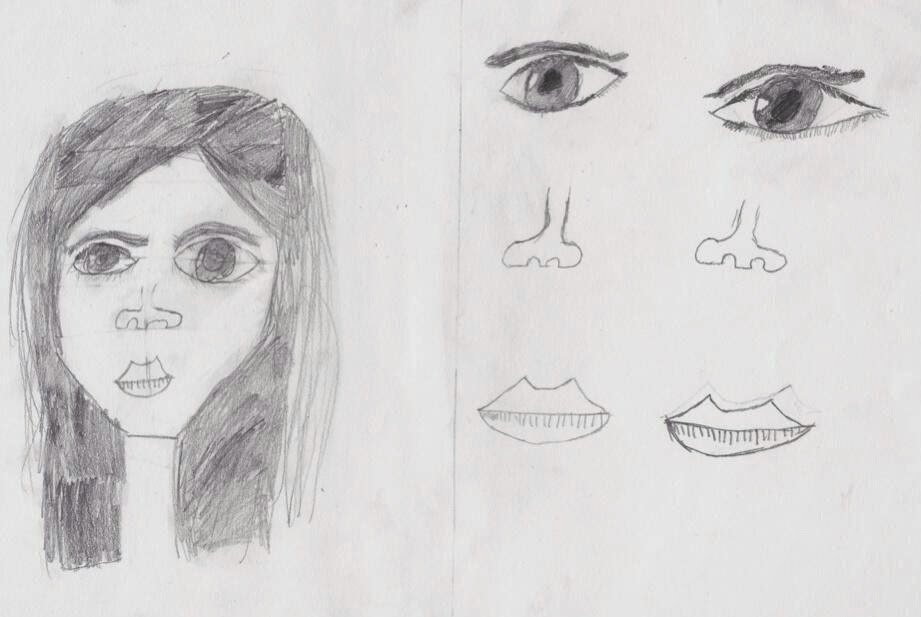
I found video guides on how to draw the proportions of the face and how to draw eyes, noses and mouths.  The children were to watch the videos, have a go at home, bring in their sketches and, most importantly, think about which part was the most tricky - their personal next steps in learning.

It was great to see the children bringing their sketches from home and you could clearly see that they'd used the videos from the way they'd approached the sketching.  

Again, crucially they could tell me their next steps as they'd tried it at home.  They knew which videos to watch when they got to the classroom the next day. You can watch the videos I used on our school website - Pear Tree Primary School

A couple of the children in my class actually photographed their sketches with their iPads and uploaded them to Edmodo before the lesson.

"I struggled with the eyes a little, so I need to try those again."  A great piece of reflection, but shared online for the whole class to see. 

Another interesting thing happened I wasn't expecting. The parents of the children in my class sent their sketches in as well!  They are proud that their work is on display in our classroom. 

Another example of parents using the learning going on in their children's classroom to further develop their own skills.  


Returning to the real world: The classroom

Back in the classroom the children got the videos out on their iPads and MacBooks, loaded up Edmodo and began focussing on their next steps without any input from me.  I just stood back and watched them independently driving their own learning forward.

I spent more time questioning, helping, guiding and pushing the children, the vast majority of my time had been saved by flipping my classroom.

The children are still using the videos to further develop their sketching skills today during their daily sketching sessions in independent time.  They have even found other guides on how to sketch hands and different versions of sketching the face.

Where do I go from here?

I have plans to start creating a bank of videos for the children to access via a link on our Edmodo site, as they find it hard to locate videos and work from several weeks ago. I'm hoping that there is a way to 'Pin' posts to the top of the page.  Any help?

I'm going to keep flipping more areas of the curriculum for the rest of the year. I've tried PE and Science as well with some good success, particularly the PE sessions when I used a slow motion video of Usain Bolt powering out of the running blocks to help generate success criteria for a good start to a sprint. When the lesson began the children could model how to begin the race - again time saved.

Webinar - Pause, Rewind My Teacher: A Flipped Learning Approach

I presented a Webinar on Flipped learning a few weeks ago that is still available to watch online.

I'd like to thank ITS Learning for allowing me to share my research with the world.

You can watch it again on YouTube - here


It was a great experience and I'm hoping to do some more workshops in the future. If you are interested in me coming to your school to present my work on flipped learning please get in touch videosformyclassroom1@gmail.com

Follow me on Twitter @chriswaterworth

Saturday, 10 May 2014

Technology is a tool to be used, not a learning outcome.

Do we buy technology in schools without questioning why?

How many times have you been amazed by a piece of technology? If you're like me, then quite often!  I love technology, I love the way it has changed the way I work, how it has inspired me and how it has enabled me to publish things I never thought possible 10 years ago.

Now, let's look at the children in my class, the digital natives.  The technology has always been there, they've never been in a classroom without an interactive whiteboard, laptops, iPads or a projector whirring away in the background.  But how much of this technology has been used to improve their learning outcomes?

Use Technology more effectively in the classroom.
Using technology in the classroom needs a complete change in mindset and rethink of your approach to children's learning.

Technology is a tool to be used, not a learning outcome.

I cannot stress this point enough to colleagues at school, on Twitter, parents and even the children themselves.  Why are you using the technology?

Why are you using technology in the classroom?

As I stated before, I am a huge fan of technology, but it doesn't mean I use it in every learning experience.  There needs to be a very valid reason to be using technology and an outcome that has benefitted from it at the end.  If I can use a pen and pencil to make notes, do I really need Evernote?  I've found it is hard to break old habits when you have not been surrounded by technology all your life.  Our children tend not to have this difficulty.

Whenever I sit down to plan, like anybody else, I start with the outcome. The children in our school are encouraged to work in a very cross-curricular way, working on projects until a final outcome is reached after self and peer assessing to improve. I'm currently trailing this online using Edmodo - you can read about it here Online Peer Assessment 

We have begun asking the children to choose what format they wish to publish their work in, a reaction to a topic or unit of work if you like. They can write a poem, a report, film something etc. Their choice.  I've seen something quite remarkable, the children will only choose technology when they feel the project needs it.  If a written report works, then they'll do that, if they want to present something they have filmed or just presented in front of the class.  Believe it or not, not ALL children prefer to use an iPad or a MacBook to publish their work.

Looking at the image on the right shows how we need to think more carefully about why we are using technology.  I still come across teachers who will say "I need to make a video, I haven't done any ICT for a while." My answer is always the same, "Why do you need technology? Can you reach the same outstanding outcome without it?"

The most common answer is that, "Well, I haven't done any for a while." Does this mean that we are giving the children a broad and balanced curriculum when we are finding holes in things we haven't taught them yet.  I'd like to think we are further on in our classrooms than ticking boxes on QCA documents. Maybe not?  Ticking boxes tends to lead to surface learning, not deep learning.

The internet is awash with people encouraging teachers to use QR Codes, Augmented Reality, eBooks, and how everybody must learn how to programme! It instills panic in some people and they react to it without thinking how this new technology can improve the learning experience in their classrooms.

What then happens is you try it for a week (or once) and then stop doing it because it became too much work or the children didn't respond well to it.  You haven't thought deep enough about the outcome and why you're doing this.  You've reacted - "oh this looks cool!"  Ok, at least you've tried something new, engaged the children for a moment, but have you really improved the outcomes in your class? 

Start with an outcome and then work backwards.

We must not lose site of the end product, force ourselves to use the technology because you feel that you must; when actually the technology is slowing the process and is detrimental to the outcome.  Technology is great for engaging children, but if they don't see a point in using it, the outcome will usually suffer. 

I use Padlet in my classroom, a really great way to collaborate online, share pictures, web links and much more. I was once told that this would have made a great lesson. Have I used it IN a lesson? No. I haven't used it because it wouldn't have been as effective IN the classroom. It needed the children to be AWAY from the classroom for it to be successful.

Padlet: A great way to collaborate online.
I used Padlet over the Easter break to gather information about William Shakespeare to aid my planning. The children followed a link and shared facts and information.

This could have been done with a sheet of paper IN the classroom and still have been as effective, but the children were not IN the classroom, they were  all at home.

I used the technology more effectively because I thought about why it would work better. I could have sent a sheet of paper home, then collated the information at a later date, but using Padlet enhanced the process and outcome.  

Using this technology helped me as well.  I didn't need to wait for the children to arrive back at school to plan their next learning adventure, I gained two weeks of planning and preparation time - great time management on my behalf.  And from a flipped learning point of view, the children were gathering knowledge and understanding outside the classroom so we didn't need to cover as much IN class.

Keeping up with the Joneses.

Schools tend to do this a lot.  They go and visit a school and then cherry pick the technology that they've seen. "Well they've got 1:1 iPads, maybe we should get them?" Try not to react like this, you need to consider these things before buying any sort of technology:

- How will the technology enhance the learning in our school?
- How will it slide seamlessly into your current curriculum? Do you need to think again?
- What will the impact be? (People will ask, especially if you've spent £20 000)
- Who will champion the technology? One person can't drive this change!
- Are you staff trained? Will they see it as just another thing to learn?

Tick all these boxes and you have a solid vision for it, then go for it!  Make sure you keep evaluating as you go, and then react to any problems or success stories.

Enjoy the technology in the classroom, it's not going away!  But, please, please think before you jump in!


Finally, I'm presenting via a Webinar on Tuesday 13th May at 4.00pm. You can register via this link - Flipped Learning Webinar


Follow me on Twitter @chriswaterworth